Custom Crops
FORMAT VERSION 1.26.50
This tutorial assumes a good understanding of blocks and scripting. Check out the blocks guide, block states and block events before starting.
If you aren't a fan of carrots — that's fine. You can make your own (far superior) crop!
Making crops is not as difficult as you may think, it just takes a little practice and forethought in coding a specific series of events. This page will guide you through the process of creating a unique crop block as well as its seed and food items.
Issues:
- Custom crops cannot be destroyed by flowing lava.
- Custom crops cannot be grown by bees carrying nectar.
- Custom crops drop as items when destroyed by an item with the "Silk Touch" enchantment.
- Custom crop drop rates do not match vanilla and are not affected by the "Fortune" enchantment.
- Custom crops can be interacted with, even when the player is not holding a fertilizer such as Bone Meal.
- Pressing "Pick Block" when looking a custom crop results in the player being given a crop block rather than seeds.
Crop Model
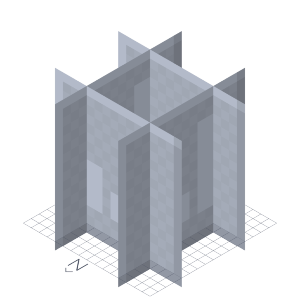
If you look at crops like carrots and potatoes in-game, you will see that they are made up of 4 planes that are situated 4 pixels from each edge, as shown in the screenshot below.
It is noteworthy to mention that each plane sits 1 pixel down, unlike traditional blocks. If you forget to lower the planes down by one, then the crops will appear to grow one pixel higher then the top of farmland which has a shorter model.
By lowering the position down a pixel, it will sit above farmland perfectly making everything right in our blocky world. Here is a template model for the crop:
Example Crop Model
{
    "format_version": "1.26.50",
    "minecraft:geometry": [
        {
            "description": {
                "identifier": "geometry.custom_crop",
                "texture_width": 16,
                "texture_height": 16
            },
            "bones": [
                {
                    "name": "crop",
                    "pivot": [0, 0, 0],
                    "cubes": [
                        {
                            "origin": [-8, -1, -4],
                            "size": [16, 16, 0],
                            "uv": {
                                "north": { "uv": [0, 0], "uv_size": [16, 16] },
                                "south": { "uv": [0, 0], "uv_size": [16, 16] }
                            }
                        },
                        {
                            "origin": [-8, -1, 4],
                            "size": [16, 16, 0],
                            "uv": {
                                "north": { "uv": [0, 0], "uv_size": [16, 16] },
                                "south": { "uv": [0, 0], "uv_size": [16, 16] }
                            }
                        },
                        {
                            "origin": [4, -1, -8],
                            "size": [0, 16, 16],
                            "uv": {
                                "east": { "uv": [0, 0], "uv_size": [16, 16] },
                                "west": { "uv": [0, 0], "uv_size": [16, 16] }
                            }
                        },
                        {
                            "origin": [-4, -1, -8],
                            "size": [0, 16, 16],
                            "uv": {
                                "east": { "uv": [0, 0], "uv_size": [16, 16] },
                                "west": { "uv": [0, 0], "uv_size": [16, 16] }
                            }
                        }
                    ]
                }
            ]
        }
    ]
}Initial Block JSON
To start with, we want our crops to have 8 stages of growth like vanilla crops, so the block should include a state with 8 values.
This code example also includes the base components of our crop which will be active in every permutation.
{
    "format_version": "1.26.50",
    "minecraft:block": {
        "description": {
            "identifier": "wiki:custom_crop",
            "states": {
                "wiki:growth": {
                    "values": { "min": 0, "max": 7 }
                }
            }
        },
        "components": {
            "minecraft:tags": ["minecraft:crop"],
            "minecraft:collision_box": false,
            // Visuals
            "minecraft:destruction_particles": {
                "particle_count": 48
            },
            "minecraft:geometry": "geometry.custom_crop", // Model provided in the previous step
            "minecraft:material_instances": {
                "*": {
                    "texture": "wiki:custom_crop_0",
                    "render_method": "alpha_test_single_sided",
                    "ambient_occlusion": 0,
                    "face_dimming": false
                }
            },
            // Break the crop if it isn't placed on farmland
            "minecraft:placement_filter": {
                "conditions": [
                    {
                        "allowed_faces": ["up"],
                        "block_filter": ["minecraft:farmland"]
                    }
                ]
            },
            // Prevent rain from splashing and snow from accumulating on top of the block
            "minecraft:precipitation_interactions": {
                "precipitation_behavior": "none"
            },
            // Break the crop when water flows into it
            "minecraft:liquid_detection": {
                "detection_rules": [
                    {
                        "liquid_type": "water",
                        "on_liquid_touches": "popped"
                    }
                ]
            },
            // Break the crop when it is pushed by a piston
            "minecraft:movable": {
                "movement_type": "popped"
            },
            // Prevent blocks such as fences and glass panes from connecting
            "minecraft:connection_rule": {
                "accepts_connections_from": "none"
            },
            "minecraft:sound": {
                "sound": "grass"
            }
        }
    }
}Crop Growth Component
Minecraft doesn't expose the vanilla crop growth functionality for use in custom blocks, so we'll have to re-create the growth system from scratch using a custom component!
Parameters
Over the next few headings, we'll explore the code behind replicating vanilla crop growth using the following parameters. Afterwards, you'll be provided with the full script which can be copied into your pack.
Crop Growth Parameters
growth_state— String- The name of the state used for the crop's current growth stage.
- In this tutorial, we will be using
wiki:growthbut you should change the namespace to something that uniquely identifies your add-on.
max_growth— Integer- The maximum value of the growth state.
min_light_level— Integer- The minimum light level required for the crop to grow via random ticking.
farmland_search_range— Integer- Maximum offset in each direction of the X and Z axes where farmland can be found.
farmland_speed_modifier— Float- Growth speed added per farmland block found.
farmland_moisture_speed_modifier— Float- Growth speed added in addition to
farmland_speed_modifierif the farmland is wet.
- Growth speed added in addition to
neighboring_farmland_speed_multiplier— Float- The total speed modifier of each farmland block that is not directly underneath the crop is multiplied by this value before being adding to the growth speed.
crowding_speed_multiplier— Float- The total speed after searching for farmland is multiplied by this value if the crop is crowded by other crops of the same type.
growth_on_fertilize— Integer Range[min, max]- The minimum and maximum growth that can be added when a non-creative mode player interacts with the block using Bone Meal.
This is the configuration we will be using for our custom crop:
"wiki:crop_growth": {
    "growth_state": "wiki:growth",
    "max_growth": 7,
    // Require a light level of 9 or above in order to grow on random ticks
    "min_light_level": 9,
    // Match the growth speed of vanilla crops
    "farmland_search_range": 1,
    "farmland_speed_modifier": 1,
    "farmland_moisture_speed_modifier": 2,
    "neighboring_farmland_speed_multiplier": 0.25,
    "crowding_speed_multiplier": 0.5,
    // Add 2-5 growth stages at random when a non-creative mode player uses Bone Meal on the crop
    "growth_on_fertilize": [2, 5]
}Initial Script
Below is the basis for the crop growth script that will be included in the behavior pack. It imports what is required from the @minecraft/server module and sets up the registration of the custom component for use in block JSON definitions.
import { system, EquipmentSlot, GameMode } from "@minecraft/server";

export const cropGrowthComponentName = "wiki:crop_growth";

/** @type {import("@minecraft/server").BlockCustomComponent} */
const BlockCropGrowthComponent = {
    // Event hooks will go here
};

system.beforeEvents.startup.subscribe(({ blockComponentRegistry }) => {
    blockComponentRegistry.registerCustomComponent(
        cropGrowthComponentName,
        BlockCropGrowthComponent
    );
});Calculating Growth Speed
function getGrowthSpeed(crop, growthParams) {
    let speed = 1;

    // Increase growth speed based on nearby farmland blocks and their moisture
    for (const farmland of getFarmlandIterator(crop, growthParams.farmland_search_range)) {
        let speedModifier = growthParams.farmland_speed_modifier;

        const moisture = farmland.permutation.getState("moisturized_amount");
        if (moisture > 0) {
            speedModifier += growthParams.farmland_moisture_speed_modifier;
        }

        const isDirectlyBelowCrop = farmland.x === crop.x && farmland.z === crop.z;
        if (!isDirectlyBelowCrop) {
            speedModifier *= growthParams.neighboring_farmland_speed_multiplier;
        }

        speed += speedModifier;
    }

    // Halves the growth speed if there are surrounding crops of the same type in vanilla (where "crowding_speed_multiplier" is 0.5)
    if (isCrowded(crop)) {
        speed *= growthParams.crowding_speed_multiplier;
    }

    return speed;
}

function* getFarmlandIterator(crop, searchRange) {
    for (let x = -searchRange; x <= searchRange; x++) {
        for (let z = -searchRange; z <= searchRange; z++) {
            const block = crop.offset({ x, y: -1, z });

            // Yield the block if it is farmland
            const isFarmland = block?.typeId === "minecraft:farmland";
            if (isFarmland) yield block;
        }
    }
}

function isCrowded(crop) {
    const northBlock = crop.north();
    const southBlock = crop.south();
    const westBlock = crop.west();
    const eastBlock = crop.east();

    const isEnclosed =
        (westBlock?.typeId === crop.typeId || eastBlock?.typeId === crop.typeId) &&
        (northBlock?.typeId === crop.typeId || southBlock?.typeId === crop.typeId);

    if (isEnclosed) return true;

    const isCropDiagonallyAdjacent =
        northBlock?.west()?.typeId === crop.typeId ||
        northBlock?.east()?.typeId === crop.typeId ||
        southBlock?.west()?.typeId === crop.typeId ||
        southBlock?.east()?.typeId === crop.typeId;

    if (isCropDiagonallyAdjacent) return true;

    return false;
}We can now use the getGrowthSpeed() function to create another function which randomly returns true or false based on the calculated speed.
function randomInt(min, max) {
    return min + Math.floor(Math.random() * (max - min + 1));
}

export function randomShouldCropGrow(crop, growthParams) {
    const growthSpeed = getGrowthSpeed(crop, growthParams);
    const growthChanceRange = Math.floor(25 / growthSpeed);

    return randomInt(0, growthChanceRange) === 0;
}Random Ticking
Each random tick, we will make sure that the crop has enough light to grow and is not already fully grown.
Then, we use the randomShouldCropGrow() function to determine whether the crop should grow on the random tick based on the calculated growth speed.
onRandomTick({ block }, { params }) {
    // Growth parameters
    const growthState = params.growth_state;
    const maxGrowth = params.max_growth;
    const minLightLevel = params.min_light_level;

    // Ensure that the minimum light level is met
    if (block.getLightLevel() < minLightLevel) return;

    const { permutation } = block;

    // Get the current growth of the crop
    const growth = permutation.getState(growthState) ?? maxGrowth;

    // Ensure that the crop is not already fully grown
    if (growth === maxGrowth) return;

    // Only grow on some random ticks
    if (!randomShouldCropGrow(block, params)) return;

    // Increment the growth state
    block.setPermutation(permutation.withState(growthState, growth + 1));
}Fertilization
Fertilization refers to using a fertilizer (such as Bone Meal) on the crop to cause immediate growth.
For this, we'll use the onPlayerInteract() event hook to add a random value to wiki:growth when using Bone Meal, or fully grow the crop in creative mode or when using Minecraft Education's "Super Fertilizer".
onPlayerInteract({ block, dimension, player }, { params }) {
    if (!player) return;

    const equippable = player.getComponent("minecraft:equippable");
    if (!equippable) return;

    const mainhand = equippable.getEquipmentSlot(EquipmentSlot.Mainhand);
    if (!mainhand.hasItem()) return;

    const hasBoneMeal = mainhand.typeId === "minecraft:bone_meal"; // Whether the player is holding Bone Meal
    const hasRapidFertilizer = mainhand.typeId === "minecraft:rapid_fertilizer"; // Whether the player is holding Super Fertilizer (from Minecraft Eduction)

    // Exit if the player is not holding Bone Meal or Super Fertilizer
    if (!hasBoneMeal && !hasRapidFertilizer) return;

    const isCreative = player.getGameMode() === GameMode.Creative; // Whether the player is in creative mode

    // Growth parameters
    const growthState = params.growth_state;
    const growthRange = params.growth_on_fertilize;
    const maxGrowth = params.max_growth;

    const { permutation } = block;

    if (hasRapidFertilizer || isCreative) {
        // Grow the crop fully when the player is holding Super Fertilizer or is in creative mode
        block.setPermutation(permutation.withState(growthState, maxGrowth));
    }
    else {
        // Add a random amount of growth when the player is using Bone Meal and is not in creative mode
        let growth = permutation.getState(growthState);

        growth += randomInt(...growthRange); // Add a random amount of growth in the "growth_on_fertilize" range
        growth = Math.min(growth, maxGrowth); // Prevent the new growth from being over the maximum

        block.setPermutation(permutation.withState(growthState, growth));
    }

    // Decrement the item stack when the player is not in creative mode
    if (!isCreative) {
        if (mainhand.amount > 1) mainhand.amount--;
        else mainhand.setItem(undefined);
    }

    // Play effects
    const effectLocation = block.center();
    dimension.playSound("item.bone_meal.use", effectLocation);
    dimension.spawnParticle("minecraft:crop_growth_emitter", effectLocation);
}Final Script
Crop Growth Script
import { system, EquipmentSlot, GameMode } from "@minecraft/server";

const cropGrowthComponentName = "wiki:crop_growth";

/** @type {import("@minecraft/server").BlockCustomComponent} */
const BlockCropGrowthComponent = {
    onRandomTick({ block }, { params }) {
        // Growth parameters
        const growthState = params.growth_state;
        const maxGrowth = params.max_growth;
        const minLightLevel = params.min_light_level;

        // Ensure that the minimum light level is met
        if (block.getLightLevel() < minLightLevel) return;

        const { permutation } = block;

        // Get the current growth of the crop
        const growth = permutation.getState(growthState) ?? maxGrowth;

        // Ensure that the crop is not already fully grown
        if (growth === maxGrowth) return;

        // Only grow on some random ticks
        if (!randomShouldCropGrow(block, params)) return;

        // Increment the growth state
        block.setPermutation(permutation.withState(growthState, growth + 1));
    },
    onPlayerInteract({ block, dimension, player }, { params }) {
        if (!player) return;

        const equippable = player.getComponent("minecraft:equippable");
        if (!equippable) return;

        const mainhand = equippable.getEquipmentSlot(EquipmentSlot.Mainhand);
        if (!mainhand.hasItem()) return;

        const hasBoneMeal = mainhand.typeId === "minecraft:bone_meal"; // Whether the player is holding Bone Meal
        const hasRapidFertilizer = mainhand.typeId === "minecraft:rapid_fertilizer"; // Whether the player is holding Super Fertilizer (from Minecraft Eduction)

        // Exit if the player is not holding Bone Meal or Super Fertilizer
        if (!hasBoneMeal && !hasRapidFertilizer) return;

        const isCreative = player.getGameMode() === GameMode.Creative; // Whether the player is in creative mode

        // Growth parameters
        const growthState = params.growth_state;
        const growthRange = params.growth_on_fertilize;
        const maxGrowth = params.max_growth;

        const { permutation } = block;

        if (hasRapidFertilizer || isCreative) {
            // Grow the crop fully when the player is holding Super Fertilizer or is in creative mode
            block.setPermutation(permutation.withState(growthState, maxGrowth));
        } else {
            // Add a random amount of growth when the player is using Bone Meal and is not in creative mode
            let growth = permutation.getState(growthState);
            growth += randomInt(...growthRange); // Add a random amount of growth in the "growth_on_fertilize" range
            growth = Math.min(growth, maxGrowth); // Prevent the new growth from being over the maximum
            block.setPermutation(permutation.withState(growthState, growth));
        }

        // Decrement the item stack when the player is not in creative mode
        if (!isCreative) {
            if (mainhand.amount > 1) mainhand.amount--;
            else mainhand.setItem(undefined);
        }

        // Play effects
        const effectLocation = block.center();
        dimension.playSound("item.bone_meal.use", effectLocation);
        dimension.spawnParticle("minecraft:crop_growth_emitter", effectLocation);
    },
};

system.beforeEvents.startup.subscribe(({ blockComponentRegistry }) => {
    blockComponentRegistry.registerCustomComponent(
        cropGrowthComponentName,
        BlockCropGrowthComponent
    );
});

/**
 * @param {number} min The minimum integer
 * @param {number} max The maximum integer
 * @returns {number} A random integer between the `min` and `max` parameters (inclusive)
 */
function randomInt(min, max) {
    return min + Math.floor(Math.random() * (max - min + 1));
}

function randomShouldCropGrow(crop, growthParams) {
    const growthSpeed = getGrowthSpeed(crop, growthParams);
    const growthChanceRange = Math.floor(25 / growthSpeed);

    return randomInt(0, growthChanceRange) === 0;
}

/**
 * @param {import("@minecraft/server").Block} crop The block to get the growth speed of
 * @returns {number} A number representing the growth speed of the crop
 */
function getGrowthSpeed(crop, growthParams) {
    let speed = 1;

    // Increase growth speed based on nearby farmland blocks and their moisture
    for (const farmland of getFarmlandIterator(crop, growthParams.farmland_search_range)) {
        let speedModifier = growthParams.farmland_speed_modifier;

        const moisture = farmland.permutation.getState("moisturized_amount");
        if (moisture > 0) {
            speedModifier += growthParams.farmland_moisture_speed_modifier;
        }

        const isDirectlyBelowCrop = farmland.x === crop.x && farmland.z === crop.z;
        if (!isDirectlyBelowCrop) {
            speedModifier *= growthParams.neighboring_farmland_speed_multiplier;
        }

        speed += speedModifier;
    }

    // Halves the growth speed if there are surrounding crops of the same type in vanilla (where "crowding_speed_multiplier" is 0.5)
    if (isCrowded(crop)) {
        speed *= growthParams.crowding_speed_multiplier;
    }

    return speed;
}

/**
 * @param {import("@minecraft/server").Block} crop
 * @param {number} searchRange Maximum offset in each direction of the X and Z axes where farmland can be found
 * @returns {Generator} A generator that iterates through each farmland block in an area underneath the crop
 */
function* getFarmlandIterator(crop, searchRange) {
    for (let x = -searchRange; x <= searchRange; x++) {
        for (let z = -searchRange; z <= searchRange; z++) {
            const block = crop.offset({ x, y: -1, z });

            // Yield the block if it is farmland
            const isFarmland = block?.typeId === "minecraft:farmland";
            if (isFarmland) yield block;
        }
    }
}

/**
 * @param {Block} crop
 * @returns {boolean} Whether there are surrounding crops of the same type
 */
function isCrowded(crop) {
    const northBlock = crop.north();
    const southBlock = crop.south();
    const westBlock = crop.west();
    const eastBlock = crop.east();

    const isEnclosed =
        (westBlock?.typeId === crop.typeId || eastBlock?.typeId === crop.typeId) &&
        (northBlock?.typeId === crop.typeId || southBlock?.typeId === crop.typeId);

    if (isEnclosed) return true;

    const isCropDiagonallyAdjacent =
        northBlock?.west()?.typeId === crop.typeId ||
        northBlock?.east()?.typeId === crop.typeId ||
        southBlock?.west()?.typeId === crop.typeId ||
        southBlock?.east()?.typeId === crop.typeId;

    if (isCropDiagonallyAdjacent) return true;

    return false;
}Growth Permutations
So we know how to set our block states, what happens when our block has a particular permutation?
The permutations array below sets the block's selection box, loot table and texture based on its wiki:growth state. For example, if wiki:growth is 7, the texture is set to "wiki:custom_crop_3" and the crop is able to drop food.
"permutations": [
    {
        "condition": "q.block_state('wiki:growth') < 7",
        "components": {
            // Loot table for when the crop is not fully grown; vanilla crops only drop seeds when young
            "minecraft:loot": "loot_tables/wiki/blocks/custom_crop_young.json"
        }
    },
    {
        "condition": "q.block_state('wiki:growth') == 0",
        "components": {
            "minecraft:selection_box": {
                "origin": [-8, 0, -8],
                "size": [16, 1.6, 16]
            }
        }
    },
    {
        "condition": "q.block_state('wiki:growth') == 1",
        "components": {
            "minecraft:selection_box": {
                "origin": [-8, 0, -8],
                "size": [16, 3.2, 16]
            }
        }
    },
    {
        "condition": "q.block_state('wiki:growth') >= 2",
        "components": {
            "minecraft:material_instances": {
                "*": {
                    "texture": "wiki:custom_crop_1",
                    "render_method": "alpha_test_single_sided",
                    "ambient_occlusion": 0,
                    "face_dimming": false
                }
            }
        }
    },
    {
        "condition": "q.block_state('wiki:growth') == 2",
        "components": {
            "minecraft:selection_box": {
                "origin": [-8, 0, -8],
                "size": [16, 4.8, 16]
            }
        }
    },
    {
        "condition": "q.block_state('wiki:growth') == 3",
        "components": {
            "minecraft:selection_box": {
                "origin": [-8, 0, -8],
                "size": [16, 6.4, 16]
            }
        }
    },
    {
        "condition": "q.block_state('wiki:growth') >= 4",
        "components": {
            "minecraft:material_instances": {
                "*": {
                    "texture": "wiki:custom_crop_2",
                    "render_method": "alpha_test_single_sided",
                    "ambient_occlusion": 0,
                    "face_dimming": false
                }
            }
        }
    },
    {
        "condition": "q.block_state('wiki:growth') == 4",
        "components": {
            "minecraft:selection_box": {
                "origin": [-8, 0, -8],
                "size": [16, 8, 16]
            }
        }
    },
    {
        "condition": "q.block_state('wiki:growth') == 5",
        "components": {
            "minecraft:selection_box": {
                "origin": [-8, 0, -8],
                "size": [16, 9.6, 16]
            }
        }
    },
    {
        "condition": "q.block_state('wiki:growth') == 6",
        "components": {
            "minecraft:selection_box": {
                "origin": [-8, 0, -8],
                "size": [16, 11.2, 16]
            }
        }
    },
    {
        "condition": "q.block_state('wiki:growth') == 7",
        "components": {
            "minecraft:material_instances": {
                "*": {
                    "texture": "wiki:custom_crop_3",
                    "render_method": "alpha_test_single_sided",
                    "ambient_occlusion": 0,
                    "face_dimming": false
                }
            },
            "minecraft:selection_box": {
                "origin": [-8, 0, -8],
                "size": [16, 12.8, 16]
            },
            // Drop different loot when fully grown
            "minecraft:loot": "loot_tables/wiki/blocks/custom_crop_mature.json"
        }
    }
]GROWTH STAGES
You can have more or fewer growth permutations depending on how many stages you want your crop to have. However, don't forget to also change the state's max parameter and the component's max_growth parameter.
Final Block JSON
Here is the entire wiki:custom_crop file for reference.
Custom Crop Block JSON
{
    "format_version": "1.26.50",
    "minecraft:block": {
        "description": {
            "identifier": "wiki:custom_crop",
            "states": {
                "wiki:growth": {
                    "values": { "min": 0, "max": 7 }
                }
            }
        },
        "components": {
            "minecraft:tags": ["minecraft:crop"],
            "minecraft:collision_box": false,
            // Trigger growth on random ticks and when interacting with Bone Meal
            "wiki:crop_growth": {
                "growth_state": "wiki:growth",
                "max_growth": 7,
                // Require a light level of 9 or above in order to grow on random ticks
                "min_light_level": 9,
                // Match the growth speed of vanilla crops
                "farmland_search_range": 1,
                "farmland_speed_modifier": 1,
                "farmland_moisture_speed_modifier": 2,
                "neighboring_farmland_speed_multiplier": 0.25,
                "crowding_speed_multiplier": 0.5,
                // Add 2-5 growth stages at random when a non-creative mode player uses Bone Meal on the crop
                "growth_on_fertilize": [2, 5]
            },
            // Visuals
            "minecraft:destruction_particles": {
                "particle_count": 48
            },
            "minecraft:geometry": "geometry.custom_crop",
            "minecraft:material_instances": {
                "*": {
                    "texture": "wiki:custom_crop_0",
                    "render_method": "alpha_test_single_sided",
                    "ambient_occlusion": 0,
                    "face_dimming": false
                }
            },
            // Break the crop if it isn't placed on farmland
            "minecraft:placement_filter": {
                "conditions": [
                    {
                        "allowed_faces": ["up"],
                        "block_filter": ["minecraft:farmland"]
                    }
                ]
            },
            // Prevent rain from splashing and snow from accumulating on top of the block
            "minecraft:precipitation_interactions": {
                "precipitation_behavior": "none"
            },
            // Break the crop when water flows into it
            "minecraft:liquid_detection": {
                "detection_rules": [
                    {
                        "liquid_type": "water",
                        "on_liquid_touches": "popped"
                    }
                ]
            },
            // Break the crop when it is pushed by a piston
            "minecraft:movable": {
                "movement_type": "popped"
            },
            // Prevent blocks such as fences and glass panes from connecting
            "minecraft:connection_rule": {
                "accepts_connections_from": "none"
            },
            "minecraft:sound": {
                "sound": "grass"
            }
        },
        "permutations": [
            {
                "condition": "q.block_state('wiki:growth') < 7",
                "components": {
                    // Loot table for when the crop is not fully grown; vanilla crops only drop seeds when young
                    "minecraft:loot": "loot_tables/wiki/blocks/custom_crop_young.json"
                }
            },
            {
                "condition": "q.block_state('wiki:growth') == 0",
                "components": {
                    "minecraft:selection_box": {
                        "origin": [-8, 0, -8],
                        "size": [16, 1.6, 16]
                    }
                }
            },
            {
                "condition": "q.block_state('wiki:growth') == 1",
                "components": {
                    "minecraft:selection_box": {
                        "origin": [-8, 0, -8],
                        "size": [16, 3.2, 16]
                    }
                }
            },
            {
                "condition": "q.block_state('wiki:growth') >= 2",
                "components": {
                    "minecraft:material_instances": {
                        "*": {
                            "texture": "wiki:custom_crop_1",
                            "render_method": "alpha_test_single_sided",
                            "ambient_occlusion": 0,
                            "face_dimming": false
                        }
                    }
                }
            },
            {
                "condition": "q.block_state('wiki:growth') == 2",
                "components": {
                    "minecraft:selection_box": {
                        "origin": [-8, 0, -8],
                        "size": [16, 4.8, 16]
                    }
                }
            },
            {
                "condition": "q.block_state('wiki:growth') == 3",
                "components": {
                    "minecraft:selection_box": {
                        "origin": [-8, 0, -8],
                        "size": [16, 6.4, 16]
                    }
                }
            },
            {
                "condition": "q.block_state('wiki:growth') >= 4",
                "components": {
                    "minecraft:material_instances": {
                        "*": {
                            "texture": "wiki:custom_crop_2",
                            "render_method": "alpha_test_single_sided",
                            "ambient_occlusion": 0,
                            "face_dimming": false
                        }
                    }
                }
            },
            {
                "condition": "q.block_state('wiki:growth') == 4",
                "components": {
                    "minecraft:selection_box": {
                        "origin": [-8, 0, -8],
                        "size": [16, 8, 16]
                    }
                }
            },
            {
                "condition": "q.block_state('wiki:growth') == 5",
                "components": {
                    "minecraft:selection_box": {
                        "origin": [-8, 0, -8],
                        "size": [16, 9.6, 16]
                    }
                }
            },
            {
                "condition": "q.block_state('wiki:growth') == 6",
                "components": {
                    "minecraft:selection_box": {
                        "origin": [-8, 0, -8],
                        "size": [16, 11.2, 16]
                    }
                }
            },
            {
                "condition": "q.block_state('wiki:growth') == 7",
                "components": {
                    "minecraft:material_instances": {
                        "*": {
                            "texture": "wiki:custom_crop_3",
                            "render_method": "alpha_test_single_sided",
                            "ambient_occlusion": 0,
                            "face_dimming": false
                        }
                    },
                    "minecraft:selection_box": {
                        "origin": [-8, 0, -8],
                        "size": [16, 12.8, 16]
                    },
                    // Drop different loot when fully grown
                    "minecraft:loot": "loot_tables/wiki/blocks/custom_crop_mature.json"
                }
            }
        ]
    }
}Crop Loot
Below are some example loot tables that your custom crop could use:
Young Crop Loot Table
{
    "pools": [
        {
            "rolls": 1,
            "entries": [
                {
                    "type": "item",
                    "name": "wiki:custom_seeds"
                }
            ]
        }
    ]
}Mature Crop Loot Table
{
    "pools": [
        {
            "rolls": 1,
            "entries": [
                {
                    "type": "item",
                    "name": "wiki:custom_food",
                    "functions": [
                        {
                            "function": "set_count",
                            "count": { "min": 2, "max": 5 }
                        }
                    ]
                }
            ]
        },
        {
            "rolls": 1,
            "entries": [
                {
                    "type": "item",
                    "name": "wiki:custom_seeds",
                    "functions": [
                        {
                            "function": "set_count",
                            "count": { "min": 1, "max": 4 }
                        }
                    ]
                }
            ]
        }
    ]
}Custom Seeds
Holding a crop block in your hand wouldn't look right, so we place the crop with seeds! Below is the JSON for a custom item that places your crop.
{
    "format_version": "1.26.50",
    "minecraft:item": {
        "description": {
            "identifier": "wiki:custom_seeds", // Make sure this is different from your crop's ID
            "menu_category": {
                "category": "nature",
                "group": "minecraft:itemGroup.name.seed"
            }
        },
        "components": {
            "minecraft:block_placer": {
                "block": "wiki:custom_crop"
            },
            "minecraft:compostable": {
                "composting_chance": 30 // 30% chance to increment the compost level
            },
            "minecraft:icon": "wiki:custom_seeds"
        }
    }
}Custom Food
Your crop can't only drop seeds! Create a custom food using the template below.
{
    "format_version": "1.26.50",
    "minecraft:item": {
        "description": {
            "identifier": "wiki:custom_food", // Make sure this is different from your crop and seeds' ID.
            "menu_category": {
                "category": "nature",
                "group": "minecraft:itemGroup.name.crop"
            }
        },
        "components": {
            "minecraft:icon": "wiki:custom_food",
            "minecraft:compostable": {
                "composting_chance": 65 // 65% chance to increment the compost level
            },
            "minecraft:food": {
                "nutrition": 4,
                "saturation_modifier": 0.6
            },
            "minecraft:use_animation": "eat",
            "minecraft:use_modifiers": {
                "use_duration": 1.6,
                "movement_modifier": 0.35
            },
            "minecraft:tags": {
                "tags": ["minecraft:is_food"]
            }
        }
    }
}Result
Your pack should now contain the following files:
- custom_crop.json
- custom_food.json
- custom_seeds.json
- custom_crop_mature.json
- custom_crop_young.json
- cropGrowth.js
With the help of this tutorial/template, you now have the knowledge and skills to create your own custom crop, as well as its seed and food items.
Contributors


Text and image content on this page is licensed under the Creative Commons Attribution 4.0 International License
Code samples on this page are licensed under the MIT License