Bedrock Wiki
  • Discord
  • Contribute
  • bedrock.dev
  • MS Learn
Beginner's Guide
  • Guide
    • 1. Introduction
      guide
    • 2. Add-Ons Explained
    • 3. Software & Preparation
    • 4. Project Setup
    • 5. Create a Custom Item
    • 6. Create a Custom Entity
    • 7. Blockbench: Modeling, Texturing & Animating
    • 8. Adding a Loot Table, Spawn Rule & Crafting Recipe
  • Extra
    • a. Understanding JSON
    • b. Download Example Packs
    • c. Troubleshooting
      help
    • d. Advanced Manifest
    • e. Format Versions
    • f. Project Setup Android
Animation Controllers
  • Intro to Animation Controllers
    guide
  • Entity Commands
  • AFK Detector
  • Death Commands
  • Molang into Scoreboard
  • Respawn Commands
Blocks
  • General
    • Intro to Blocks
      guide
    • Block Components
    • Block Tags
    • Block States
    • Block Traits
    • Block Permutations
    • Block Events
      Scripts
    • Block Event Migration
      help
    • Blocks as Items
    • Troubleshooting Blocks
      help
  • Visuals
    • Block Culling
    • Block Models
      guide
    • Block Texture Animation
    • Block Texture Variation
    • Block Tinting
  • Tutorials
    • Applying Effects
      Scripts
    • Avoiding State Limit
    • Block Orientation
    • Fake Blocks
      Scripts
    • Intercardinal Orientation
      Scripts
    • Ore Loot Tables
      Scripts
    • Tool-Based Destruction
  • Vanilla Re-Creations
    • Custom Crops
      Scripts
    • Custom Glass
    • Custom Glazed Terracotta
    • Custom Heads
      Scripts
    • Custom Trapdoors
      Scripts
  • Documentation
    • Block Format History
    • Block Shapes
    • Block Sounds
    • Redstone Components
    • Vanilla Block Models
    • Vanilla Block Tags
Commands
  • General
    • Intro to Command Blocks
    • Functions
    • Block States
    • Coordinate System
    • Giving NBT Items
    • Scoreboard Operations
    • Understanding Selectors
  • Commands
    • Damage
    • Execute
    • Playanimation
    • Playsound
  • On Event Systems
    • On First World Load
    • On Player First Join
    • On Player Join
    • On Player Leave
    • On Player Death
    • On Player Respawn
  • Scoreboard Systems
    • Entity Counter
    • Scoreboard Timers
    • Comparing And Retrieving Scores
  • Techniques
    • Execute Logic Gates
    • Execute at Block Variant
    • MBE - Max's Block Entity
    • FMBE - A New Way to Create Display Entities
    • Item Drop Detection
    • Look Detection
    • Movement Detections
    • Orbital Camera
  • Useful Creations
    • Compass Display
    • Custom Crafter
    • Multiplayer Position Rearrangement
      function
Concepts
  • contents.json
  • Molang
  • Namespaces
  • Overwriting Assets
  • Shaders
  • Sounds
  • Subpacks
  • Texture Atlases
  • textures_list.json
Documentation
  • Advanced Molang
  • File Types
  • Fog IDs
  • Material Configuration Description
  • Molang Queries
  • Pack Folder Structure
  • Shared Constructs
  • Sound Definitions
  • Vanilla Materials
Entities
  • General
    • Intro to Entities BP
      guide
    • Intro to Entities RP
      guide
    • Troubleshooting Entities
      help
    • Entity Events
    • Entity Properties
    • NPC Dialogue
    • Render Controllers
    • Spawn Rules
  • Tutorials
    • Convert Points Between Any Space (World, Entity, Bones)
    • Creating Boats
    • Detecting Other Entities
    • Disabling Team Damage
    • Dummy Entities
    • Entity Attacks
    • Entity Holds Item
    • Entity Movement
    • Entity Timers
    • Introduction to AOE Clouds
    • Invulnerable Entities
    • Look at Entity
    • Riding Flying Entities
    • Sleeping Entities
    • Solid Entities
    • Spawning Tamed Entities
      Scripts
    • Village Mechanic
  • Documentation
    • Dummy Components
    • Non-Mob Runtime Identifiers
    • Projectiles
    • Runtime Identifiers
    • Vanilla Usage Components
    • Vanilla Usage Spawn Rules
Items
  • General
    • Intro to Items
      guide
    • Item Components
    • Item Tags
    • Item Events
      Scripts
    • Item Event Migration
      help
    • Item Catalog
    • Troubleshooting Items
      help
  • Tutorials
    • Custom Armor
    • Custom Food
      Scripts
    • Custom Pottery Sherds
    • Custom Weapons
    • Equipment-Based Commands
    • Spawning Items
    • Throwable Items
  • Documentation
    • Enchantments
    • Attachables
    • Item Format History
    • Numerical Item IDs
    • Vanilla Item Groups
    • Vanilla Item Tags
    • Vanilla Usage Components
JSON UI
  • General
    • Intro to JSON UI
      guide
    • Best Practices
      guide
  • Tutorials
    • Adding HUD Elements
    • Aseprite Animations
    • Buttons and Toggles
    • Modifying Server Forms
    • Preserve Title Texts
    • String to Number
  • Documentation
    • JSON UI Documentation
Loot, Recipes & Trading
  • General
    • Trading Behavior
  • Documentation
    • Loot Tables
    • Trade Tables
    • Recipes
    • Item Functions
  • Tutorials
    • Randomized Structure Loot
Meta
  • Add-On Performance
  • Style Guide
  • Useful Links
  • Using Schemas
  • Version Control
  • Q&A
    • Blocks and Items Q&A 2024/08/30
    • Deferred Technical Preview Q&A 2024/02/23
    • GameTest Q&A 2021/08/06
    • Scripting and Editor Q&A 2023/09/22
    • World Generation Q&A 2024/11/15
NBT
  • General
    • .mcstructure
  • Tutorials
    • Enabling Experiments by Editing NBT
    • Extending Structure Limits
  • NBT in Depth
    • About NBT (Named Binary Tag)
    • NBT Libraries
    • Reading NBT Example
Particles
  • General
    • Intro to Particles
      guide
  • Tutorials
    • Disabling Particles
  • Documentation
    • Vanilla Particles
Scripting
  • General
    • Intro to Scripting
    • What is Script API?
    • API Modules
  • Tutorials
    • Block Placement Prevention
    • Custom Commands
    • GameTests
    • Script Core Features
    • Script Forms
    • Script Privileges
    • Script Requests API
  • Documentation
    • Engine Environment
    • Script Resources
    • Script Watchdog
    • Troubleshooting JavaScript
    • TypeScript
Servers
  • Software
    • Bedrock Server Software
  • Protocols
    • Bedrock Protocol
    • NetherNet Protocol
    • RakNet Protocol
Text & Localization
  • General
    • Intro to Text & Localization
    • Raw Text
    • Splashes
  • Emojis & Symbols
    • Fonts
    • Intro to Emojis
    • Custom Emojis
    • Input Keys
Visuals
  • General
    • Introduction to Entity Visuals
      guide
    • Bedrock Modeling
    • Custom Death Animations
    • Effects in Animations
    • Material Creations
    • Materials
    • Math-Based Animations
    • Skin Packs
  • Tutorials
    • Entity Texture Animation
    • Glowing Entity Texture
    • Hurt Animations
    • Leash Position
    • Player Geometry
    • Remove Entity Shadows
    • Retexturing Spawn Eggs
  • Ideas
    • Structure Presentation
World Generation
  • General
    • Intro to World Generation
      guide
    • Biomes
      guide
    • Feature Types
    • Jigsaw Structures
  • Tutorials
    • Block Conditions for Features
    • Generating Custom Ores
    • Generating Custom Structures
    • Generating Patches
    • Heightmap Noise
  • Documentation
    • Biome Tags

Custom Heads

expert
scripting
Custom Heads
  • Initial Block JSON
  • Defining the Direction States
  • Setting the Direction States
  • Block Model
    • Cardinal Bone
    • Intercardinal Bones
    • Example Model
  • Applying Block Rotation
    • Bone Visibility
    • Permutation Entries
  • Final Block JSON
  • Item JSON
  • Charged Creeper Drops
  • Result
    • Download Example Pack

FORMAT VERSION 1.26.0

This tutorial assumes an advanced understanding of blocks, items and scripting. Check out the blocks guide, block states and block events before starting.

In this tutorial you will learn how to create your own mob head blocks.

Features:

  • Able to face any of 16 directions when placed on the ground and attach to the side faces of adjacent blocks.
  • Able to be worn on the heads of entities, hiding players on the locator bar and maps.
  • Drops as an item when the appropriate mob is exploded by a charged creeper.

Issues:

  • Custom heads cannot be stacked as items (MCPE-176931).
  • Custom heads cannot be used to craft firework stars.
  • When enchanted, custom heads lack an enchantment glint outside of the user interface.

By the end of this tutorial, you should have created something like this:
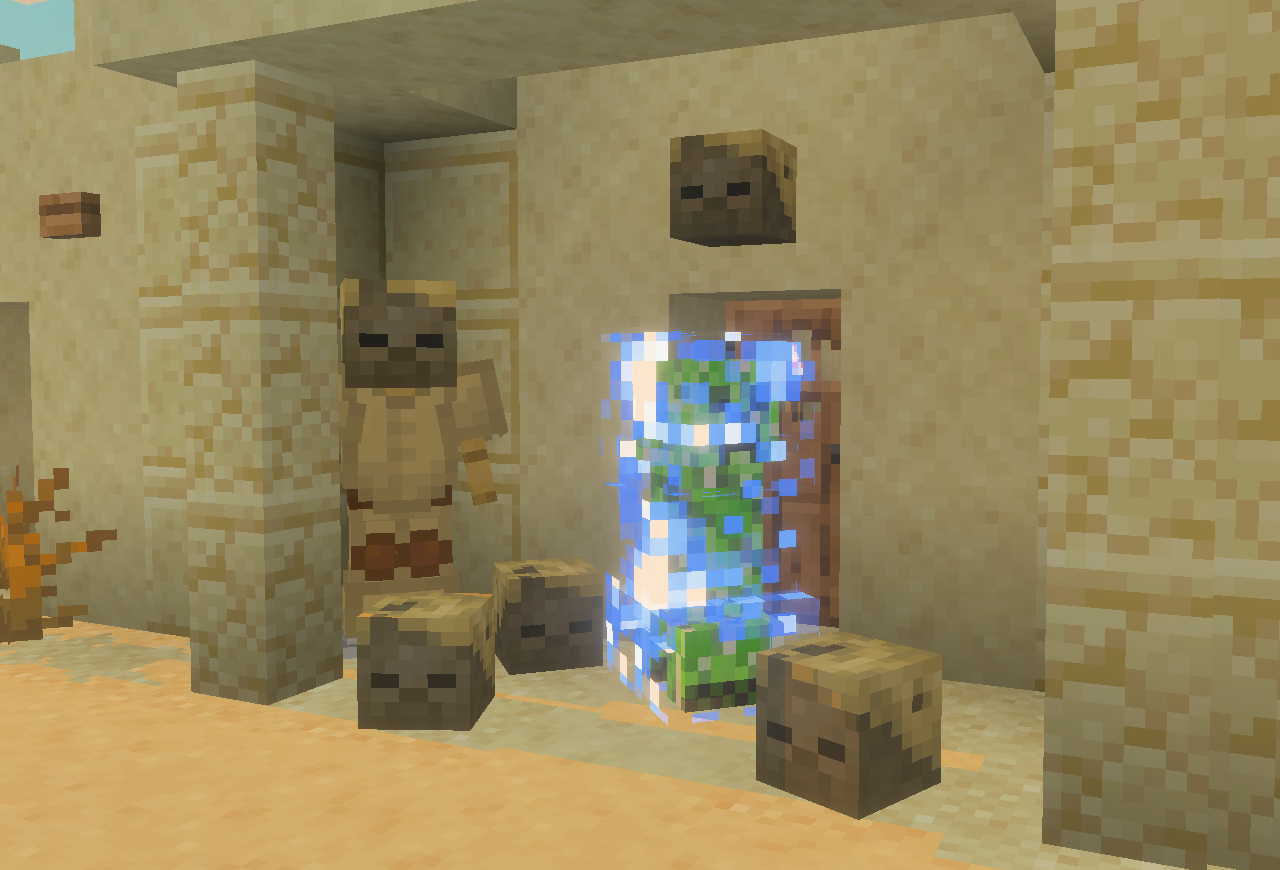
A charged creeper, surrounded by husk heads, waiting eagerly outside a desert villager's house

Initial Block JSON ​

Note that the block description does not have the menu_category parameter as that will be defined in the item JSON instead in a later step.

BP/blocks/custom_head.json
json
{
    "format_version": "1.26.0",
    "minecraft:block": {
        "description": {
            "identifier": "wiki:custom_head"
        },
        "components": {
            // Collision and selection boxes
            "minecraft:collision_box": {
                "origin": [-4, 0, -4],
                "size": [8, 8, 8]
            },
            "minecraft:selection_box": {
                "origin": [-4, 0, -4],
                "size": [8, 8, 8]
            },
            // Prevents blocks (such as fences) from connecting to the block
            "minecraft:connection_rule": {
                "accepts_connections_from": "none"
            },
            // Prevents the block from being placed on the bottom face of another block
            "minecraft:placement_filter": {
                "conditions": [{ "allowed_faces": ["up", "side"] }]
            },
            // Prevents snow from accumulating above the block
            "minecraft:precipitation_interactions": {
                "precipitation_behavior": "none"
            },
            // Destruction
            "minecraft:destructible_by_explosion": {
                "explosion_resistance": 5
            },
            "minecraft:destructible_by_mining": {
                "seconds_to_destroy": 1
            },
            "minecraft:destruction_particles": {
                "particle_count": 48,
                "texture": "soul_sand"
            },
            // Break and drop as an item when pushed by a piston
            "minecraft:movable": {
                "movement_type": "popped"
            },
            "minecraft:liquid_detection": {
                "detection_rules": [
                    {
                        "liquid_type": "water",
                        "can_contain_liquid": true, // Allows the block to be waterlogged
                        "on_liquid_touches": "popped" // Break and drop as an item when water flows into the block
                    }
                ]
            },
            // Visuals
            "minecraft:material_instances": {
                "down": {
                    "texture": "wiki:custom_head_bottom",
                    "ambient_occlusion": false
                },
                "up": {
                    "texture": "wiki:custom_head_top",
                    "ambient_occlusion": false
                },
                "north": {
                    "texture": "wiki:custom_head_front",
                    "ambient_occlusion": false
                },
                "south": {
                    "texture": "wiki:custom_head_back",
                    "ambient_occlusion": false
                },
                "west": {
                    "texture": "wiki:custom_head_left",
                    "ambient_occlusion": false
                },
                "east": {
                    "texture": "wiki:custom_head_right",
                    "ambient_occlusion": false
                }
            }
        }
    }
}
1
2
3
4
5
6
7
8
9
10
11
12
13
14
15
16
17
18
19
20
21
22
23
24
25
26
27
28
29
30
31
32
33
34
35
36
37
38
39
40
41
42
43
44
45
46
47
48
49
50
51
52
53
54
55
56
57
58
59
60
61
62
63
64
65
66
67
68
69
70
71
72
73
74
75
76
77
78
79
80
81
82

Defining the Direction States ​

Mob heads use two types of block orientation. They can be attached to the sides of adjacent blocks, or placed on the ground facing an intercardinal direction.

To support this, we'll need to add two direction states to our block:

  • For block face attachment, we will use the placement position trait to enable the minecraft:block_face state.
  • For intercardinal orientation when placed on top of another block, we will add a wiki:intercardinal_direction state and use a modified version of the wiki's intercardinal orientation system. As always, remember to change wiki to your own namespace!

Add the following to your block description:

minecraft:block > description
json
"traits": {
    "minecraft:placement_position": {
        "enabled_states": ["minecraft:block_face"]
    }
},
"states": {
    "wiki:intercardinal_direction": {
        "values": { "min": 0, "max": 15 }
    }
}
1
2
3
4
5
6
7
8
9
10

Setting the Direction States ​

Given that it's a part of a block trait, the minecraft:block_face state will be set automatically. However, to set the wiki:intercardinal_direction state to the correct value, we'll need to use a custom component.

LEARN MORE

For a more detailed explanation of how this custom component works, check out the intercardinal orientation page!

Add the following script to your BP/scripts folder to register the wiki:intercardinal_orientation component.

Intercardinal Orientation Script
BP/scripts/intercardinalOrientation.js
js
import { system } from "@minecraft/server";

/** @param {number} yRotation */
function getIntercardinalDirection(yRotation) {
    // Converts the Y rotation into a positive angle below 360
    yRotation %= 360;
    if (yRotation < 0) yRotation += 360;

    // Returns the Y rotation as an intercardinal direction below 16
    return Math.round(yRotation / 22.5) % 16;
}

// Make sure you change "wiki" to your own namespace!
const stateName = "wiki:intercardinal_direction";
const componentName = "wiki:intercardinal_orientation";

/** @type {import("@minecraft/server").BlockCustomComponent} */
const BlockIntercardinalOrientationComponent = {
    beforeOnPlayerPlace(event, { params }) {
        const { player } = event;
        if (!player) return;

        // Get the "y_rotation_offset" value defined in the block JSON (default to 0) and add it to the player's Y rotation
        const yRotationOffset = params.y_rotation_offset ?? 0;
        const yRotation = player.getRotation().y + yRotationOffset;

        // Get the intercardinal direction value (0-15) from the player's Y rotation
        const direction = getIntercardinalDirection(yRotation);

        // Update the block permutation being placed
        event.permutationToPlace = event.permutationToPlace.withState(stateName, direction);
    },
};

// Register the custom component with the name "wiki:intercardinal_orientation".
system.beforeEvents.startup.subscribe(({ blockComponentRegistry }) => {
    blockComponentRegistry.registerCustomComponent(
        componentName,
        BlockIntercardinalOrientationComponent
    );
});
1
2
3
4
5
6
7
8
9
10
11
12
13
14
15
16
17
18
19
20
21
22
23
24
25
26
27
28
29
30
31
32
33
34
35
36
37
38
39
40
41

Remember to import the script into your entry file!

BP/scripts/index.js
js
import "./intercardinalOrientation.js";
1

Now we can apply the component to the block when it is being placed on the up face of another block using the block permutations array.

minecraft:block
json
"permutations": [
    {
        "condition": "q.block_state('minecraft:block_face') == 'up'",
        "components": {
            // Sets the "wiki:intercardinal_direction" state to the correct value before the block is placed
            "wiki:intercardinal_orientation": {
                "y_rotation_offset": 180 // Face towards the player
            }
        }
    }
]
1
2
3
4
5
6
7
8
9
10
11

Block Model ​

Generally, the block transformation component is used to rotate blocks to match their direction, however this component only supports angles that are multiples of 90 degrees. To allow for the 22.5 degree intervals used for intercardinal rotation, your block's model will need a few extra bones.

There are four bones required for intercardinal orientation, each with different Y-axis rotations:

  • 0
  • 22.5
  • 45
  • 67.5

These rotations are in a clockwise direction when looking at the model from above.

Cardinal Bone ​

First, you need to create a bone with no rotation, where the front of the model faces north. In this tutorial, each bone will be named after its Y rotation, meaning this bone should have the name 0 as it has been rotated 0 degrees.

This is the bone that will be visible when the block is facing a cardinal direction (when wiki:intercardinal_direction is 0, 4, 8 or 12) or when the head is attached to the side of an adjacent block. At this stage, all cubes of your model must be direct children of this bone and cannot be contained in child bones.

Intercardinal Bones ​

Now you need to duplicate this bone three times with the remaining rotation values (22.5, 45 and 67.5). These duplicate bones are used when rotating the block to face an intercardinal direction.

TIP

You can duplicate bones in Blockbench by selecting the bone and pressing Ctrl + D.

Keep each bone's pivot point set to [0, 0, 0] so that its rotation is around the middle of the block.

For reference, here's how the final model looks for a basic custom head. Be warned, it isn't a pretty sight just yet!

Example Model ​

Here's the JSON code for a basic 8×8×8 head model, where each face of the block should have a separate 8×8 texture defined by material instances.

Example Head Model
RP/models/blocks/custom_head.geo.json
json
{
    "format_version": "1.26.0",
    "minecraft:geometry": [
        {
            "description": {
                "identifier": "geometry.custom_head",
                "texture_width": 8,
                "texture_height": 8
            },
            "item_display_transforms": {
                "gui": {
                    "fit_to_frame": false,
                    "rotation": [30, 225, 0],
                    "scale": [1, 1, 1],
                    "translation": [0, 3, 0]
                },
                "fixed": {
                    "scale": [1, 1, 1],
                    "translation": [0, 4, 0]
                },
                "ground": {
                    "scale": [0.5, 0.5, 0.5],
                    "translation": [0, 3, 0]
                },
                "firstperson_righthand": {
                    "rotation": [0, 180, 0],
                    "scale": [1, 1, 1]
                },
                "thirdperson_righthand": {
                    "rotation": [45, 225, 0],
                    "scale": [0.5, 0.5, 0.5],
                    "translation": [0, 3, 0]
                },
                "head": {
                    "scale": [1.9, 1.9, 1.9],
                    "translation": [0, 8, 0]
                }
            },
            "bones": [
                {
                    "name": "0",
                    "pivot": [0, 0, 0],
                    "cubes": [
                        {
                            "origin": [-4, 0, -4],
                            "size": [8, 8, 8],
                            "uv": {
                                "north": { "uv": [0, 0], "uv_size": [8, 8] },
                                "east": { "uv": [0, 0], "uv_size": [8, 8] },
                                "south": { "uv": [0, 0], "uv_size": [8, 8] },
                                "west": { "uv": [0, 0], "uv_size": [8, 8] },
                                "up": { "uv": [0, 0], "uv_size": [8, 8] },
                                "down": { "uv": [0, 8], "uv_size": [8, -8] }
                            }
                        }
                    ]
                },
                {
                    "name": "22.5",
                    "pivot": [0, 0, 0],
                    "rotation": [0, 22.5, 0],
                    "cubes": [
                        {
                            "origin": [-4, 0, -4],
                            "size": [8, 8, 8],
                            "uv": {
                                "north": { "uv": [0, 0], "uv_size": [8, 8] },
                                "east": { "uv": [0, 0], "uv_size": [8, 8] },
                                "south": { "uv": [0, 0], "uv_size": [8, 8] },
                                "west": { "uv": [0, 0], "uv_size": [8, 8] },
                                "up": { "uv": [0, 0], "uv_size": [8, 8] },
                                "down": { "uv": [0, 8], "uv_size": [8, -8] }
                            }
                        }
                    ]
                },
                {
                    "name": "45",
                    "pivot": [0, 0, 0],
                    "rotation": [0, 45, 0],
                    "cubes": [
                        {
                            "origin": [-4, 0, -4],
                            "size": [8, 8, 8],
                            "uv": {
                                "north": { "uv": [0, 0], "uv_size": [8, 8] },
                                "east": { "uv": [0, 0], "uv_size": [8, 8] },
                                "south": { "uv": [0, 0], "uv_size": [8, 8] },
                                "west": { "uv": [0, 0], "uv_size": [8, 8] },
                                "up": { "uv": [0, 0], "uv_size": [8, 8] },
                                "down": { "uv": [0, 8], "uv_size": [8, -8] }
                            }
                        }
                    ]
                },
                {
                    "name": "67.5",
                    "pivot": [0, 0, 0],
                    "rotation": [0, 67.5, 0],
                    "cubes": [
                        {
                            "origin": [-4, 0, -4],
                            "size": [8, 8, 8],
                            "uv": {
                                "north": { "uv": [0, 0], "uv_size": [8, 8] },
                                "east": { "uv": [0, 0], "uv_size": [8, 8] },
                                "south": { "uv": [0, 0], "uv_size": [8, 8] },
                                "west": { "uv": [0, 0], "uv_size": [8, 8] },
                                "up": { "uv": [0, 0], "uv_size": [8, 8] },
                                "down": { "uv": [0, 8], "uv_size": [8, -8] }
                            }
                        }
                    ]
                }
            ]
        }
    ]
}
1
2
3
4
5
6
7
8
9
10
11
12
13
14
15
16
17
18
19
20
21
22
23
24
25
26
27
28
29
30
31
32
33
34
35
36
37
38
39
40
41
42
43
44
45
46
47
48
49
50
51
52
53
54
55
56
57
58
59
60
61
62
63
64
65
66
67
68
69
70
71
72
73
74
75
76
77
78
79
80
81
82
83
84
85
86
87
88
89
90
91
92
93
94
95
96
97
98
99
100
101
102
103
104
105
106
107
108
109
110
111
112
113
114
115
116
117
118

Applying Block Rotation ​

Bone Visibility ​

Not all bones in your model should be visible, so we make use of the bone_visibility parameter in the geometry component to ensure that only the required bones are rendered.

Add the following component to your block:

minecraft:block > components
json
"minecraft:geometry": {
    "identifier": "geometry.custom_head", // Model created in previous step
    "bone_visibility": {
        "0": "math.mod(q.block_state('wiki:intercardinal_direction'), 4) == 0",
        "22.5": "math.mod(q.block_state('wiki:intercardinal_direction'), 4) == 1",
        "45": "math.mod(q.block_state('wiki:intercardinal_direction'), 4) == 2",
        "67.5": "math.mod(q.block_state('wiki:intercardinal_direction'), 4) == 3"
    }
}
1
2
3
4
5
6
7
8
9

Permutation Entries ​

Now, use the permutations array to define the rotation for the base cardinal rotations of the block by inserting the following into your block permutations array (in the presented order):

minecraft:block > permutations
json
// Intercardinal directions
{
    "condition": "q.block_state('wiki:intercardinal_direction') >= 0",
    "components": {
        "minecraft:transformation": { "rotation": [0, 180, 0] }
    }
},
{
    "condition": "q.block_state('wiki:intercardinal_direction') >= 4",
    "components": {
        "minecraft:transformation": { "rotation": [0, 90, 0] }
    }
},
{
    "condition": "q.block_state('wiki:intercardinal_direction') >= 8",
    "components": {
        "minecraft:transformation": { "rotation": [0, 0, 0] }
    }
},
{
    "condition": "q.block_state('wiki:intercardinal_direction') >= 12",
    "components": {
        "minecraft:transformation": { "rotation": [0, -90, 0] }
    }
},
// Block face attachments
{
    "condition": "q.block_state('minecraft:block_face') == 'north'",
    "components": {
        "minecraft:transformation": {
            "rotation": [0, 0, 0],
            "translation": [0, 0.25, 0.25]
        }
    }
},
{
    "condition": "q.block_state('minecraft:block_face') == 'west'",
    "components": {
        "minecraft:transformation": {
            "rotation": [0, 90, 0],
            "translation": [0.25, 0.25, 0]
        }
    }
},
{
    "condition": "q.block_state('minecraft:block_face') == 'south'",
    "components": {
        "minecraft:transformation": {
            "rotation": [0, 180, 0],
            "translation": [0, 0.25, -0.25]
        }
    }
},
{
    "condition": "q.block_state('minecraft:block_face') == 'east'",
    "components": {
        "minecraft:transformation": {
            "rotation": [0, -90, 0],
            "translation": [-0.25, 0.25, 0]
        }
    }
}
1
2
3
4
5
6
7
8
9
10
11
12
13
14
15
16
17
18
19
20
21
22
23
24
25
26
27
28
29
30
31
32
33
34
35
36
37
38
39
40
41
42
43
44
45
46
47
48
49
50
51
52
53
54
55
56
57
58
59
60
61
62

Final Block JSON ​

Custom Head Block JSON
BP/blocks/custom_head.json
json
{
    "format_version": "1.26.0",
    "minecraft:block": {
        "description": {
            "identifier": "wiki:custom_head",
            "traits": {
                "minecraft:placement_position": {
                    "enabled_states": ["minecraft:block_face"]
                }
            },
            "states": {
                "wiki:intercardinal_direction": {
                    "values": { "min": 0, "max": 15 }
                }
            }
        },
        "components": {
            // Collision and selection boxes
            "minecraft:collision_box": {
                "origin": [-4, 0, -4],
                "size": [8, 8, 8]
            },
            "minecraft:selection_box": {
                "origin": [-4, 0, -4],
                "size": [8, 8, 8]
            },
            // Prevents blocks (such as fences) from connecting to the block
            "minecraft:connection_rule": {
                "accepts_connections_from": "none"
            },
            // Prevents the block from being placed on the bottom face of another block
            "minecraft:placement_filter": {
                "conditions": [{ "allowed_faces": ["up", "side"] }]
            },
            // Prevents snow from accumulating above the block
            "minecraft:precipitation_interactions": {
                "precipitation_behavior": "none"
            },
            // Destruction
            "minecraft:destructible_by_explosion": {
                "explosion_resistance": 5
            },
            "minecraft:destructible_by_mining": {
                "seconds_to_destroy": 1
            },
            "minecraft:destruction_particles": {
                "particle_count": 48,
                "texture": "soul_sand"
            },
            // Break and drop as an item when pushed by a piston
            "minecraft:movable": {
                "movement_type": "popped"
            },
            "minecraft:liquid_detection": {
                "detection_rules": [
                    {
                        "liquid_type": "water",
                        "can_contain_liquid": true, // Allows the block to be waterlogged
                        "on_liquid_touches": "popped" // Break and drop as an item when water flows into the block
                    }
                ]
            },
            // Visuals
            "minecraft:geometry": {
                "identifier": "geometry.custom_head",
                "bone_visibility": {
                    "0": "math.mod(q.block_state('wiki:intercardinal_direction'), 4) == 0",
                    "22.5": "math.mod(q.block_state('wiki:intercardinal_direction'), 4) == 1",
                    "45": "math.mod(q.block_state('wiki:intercardinal_direction'), 4) == 2",
                    "67.5": "math.mod(q.block_state('wiki:intercardinal_direction'), 4) == 3"
                }
            },
            "minecraft:material_instances": {
                "down": {
                    "texture": "wiki:custom_head_bottom",
                    "ambient_occlusion": false
                },
                "up": {
                    "texture": "wiki:custom_head_top",
                    "ambient_occlusion": false
                },
                "north": {
                    "texture": "wiki:custom_head_front",
                    "ambient_occlusion": false
                },
                "south": {
                    "texture": "wiki:custom_head_back",
                    "ambient_occlusion": false
                },
                "west": {
                    "texture": "wiki:custom_head_left",
                    "ambient_occlusion": false
                },
                "east": {
                    "texture": "wiki:custom_head_right",
                    "ambient_occlusion": false
                }
            }
        },
        "permutations": [
            {
                "condition": "q.block_state('minecraft:block_face') == 'up'",
                "components": {
                    // Sets the "wiki:intercardinal_direction" state to the correct value before the block is placed
                    "wiki:intercardinal_orientation": {
                        "y_rotation_offset": 180 // Face towards the player
                    }
                }
            },
            // Intercardinal directions
            {
                "condition": "q.block_state('wiki:intercardinal_direction') >= 0",
                "components": {
                    "minecraft:transformation": { "rotation": [0, 180, 0] }
                }
            },
            {
                "condition": "q.block_state('wiki:intercardinal_direction') >= 4",
                "components": {
                    "minecraft:transformation": { "rotation": [0, 90, 0] }
                }
            },
            {
                "condition": "q.block_state('wiki:intercardinal_direction') >= 8",
                "components": {
                    "minecraft:transformation": { "rotation": [0, 0, 0] }
                }
            },
            {
                "condition": "q.block_state('wiki:intercardinal_direction') >= 12",
                "components": {
                    "minecraft:transformation": { "rotation": [0, -90, 0] }
                }
            },
            // Block face attachments
            {
                "condition": "q.block_state('minecraft:block_face') == 'north'",
                "components": {
                    "minecraft:transformation": {
                        "rotation": [0, 0, 0],
                        "translation": [0, 0.25, 0.25]
                    }
                }
            },
            {
                "condition": "q.block_state('minecraft:block_face') == 'west'",
                "components": {
                    "minecraft:transformation": {
                        "rotation": [0, 90, 0],
                        "translation": [0.25, 0.25, 0]
                    }
                }
            },
            {
                "condition": "q.block_state('minecraft:block_face') == 'south'",
                "components": {
                    "minecraft:transformation": {
                        "rotation": [0, 180, 0],
                        "translation": [0, 0.25, -0.25]
                    }
                }
            },
            {
                "condition": "q.block_state('minecraft:block_face') == 'east'",
                "components": {
                    "minecraft:transformation": {
                        "rotation": [0, -90, 0],
                        "translation": [-0.25, 0.25, 0]
                    }
                }
            }
        ]
    }
}
1
2
3
4
5
6
7
8
9
10
11
12
13
14
15
16
17
18
19
20
21
22
23
24
25
26
27
28
29
30
31
32
33
34
35
36
37
38
39
40
41
42
43
44
45
46
47
48
49
50
51
52
53
54
55
56
57
58
59
60
61
62
63
64
65
66
67
68
69
70
71
72
73
74
75
76
77
78
79
80
81
82
83
84
85
86
87
88
89
90
91
92
93
94
95
96
97
98
99
100
101
102
103
104
105
106
107
108
109
110
111
112
113
114
115
116
117
118
119
120
121
122
123
124
125
126
127
128
129
130
131
132
133
134
135
136
137
138
139
140
141
142
143
144
145
146
147
148
149
150
151
152
153
154
155
156
157
158
159
160
161
162
163
164
165
166
167
168
169
170
171
172
173
174

Item JSON ​

In order to make our custom head wearable and enchantable, we'll need to replace its block item by adding a new item definition to our pack:

BP/items/custom_head.json
json
{
    "format_version": "1.26.0",
    "minecraft:item": {
        "description": {
            "identifier": "wiki:custom_head", // Must be the same identifier as the block
            "menu_category": {
                "category": "items",
                "group": "minecraft:itemGroup.name.skull"
            }
        },
        "components": {
            "minecraft:block_placer": {
                "block": "wiki:custom_head", // Must be the same identifier as the block
                "replace_block_item": true
            },
            // Use the same localization key as the block
            "minecraft:display_name": {
                "value": "tile.wiki:custom_head.name"
            },
            // Allows the head to be enchanted with "Curse of Binding" and "Curse of Vanishing"
            "minecraft:enchantable": {
                "slot": "cosmetic_head",
                "value": 0
            },
            "minecraft:max_stack_size": 1, // Currently, custom wearable items cannot be stackable
            "minecraft:rarity": "uncommon",
            // Allows the item to be equipped into the head slot
            "minecraft:wearable": {
                "hides_player_location": true, // Hides the player from the locator bar and maps like vanilla heads
                "slot": "slot.armor.head"
            }
        }
    }
}
1
2
3
4
5
6
7
8
9
10
11
12
13
14
15
16
17
18
19
20
21
22
23
24
25
26
27
28
29
30
31
32
33
34

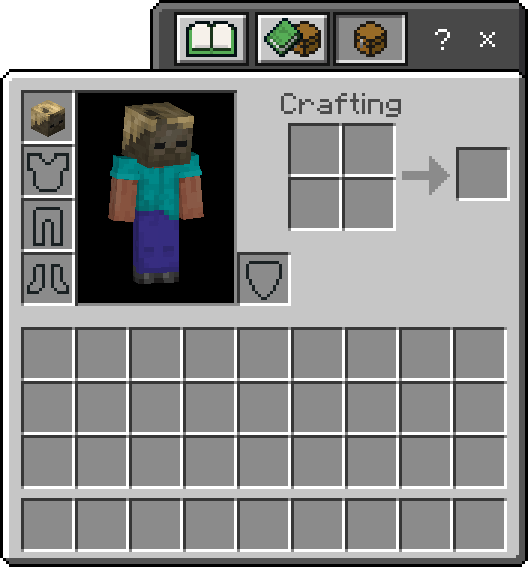
Great! Now we're able to equip the block into the head slot:
Charged Creeper Drops ​

If a vanilla mob has a mob head associated with it, that head will drop as an item when the entity is exploded by a charged creeper.

You can use the following script to add drops for any custom heads.

BP/scripts/headDrops.js
js
import { ItemStack, system, world } from "@minecraft/server";

// Object where keys are entity types and values are the item to drop when exploded by a charged creeper
const heads = {
    "minecraft:husk": "wiki:custom_head",
};

// Set containing the unique IDs of charged creepers that have exploded within the last tick
const explodingChargedCreepers = new Set();

world.beforeEvents.explosion.subscribe(({ source }) => {
    if (!source) return;

    const isCreeper = source.typeId === "minecraft:creeper";
    const isCharged = source.hasComponent("minecraft:is_charged");

    if (isCreeper && isCharged) {
        // Add the charged creeper's ID to the set
        explodingChargedCreepers.add(source.id);

        // Remove the ID after the next tick
        system.runTimeout(() => explodingChargedCreepers.delete(source.id), 1);
    }
});

world.afterEvents.entityDie.subscribe(
    (event) => {
        const { damagingEntity } = event.damageSource;
        if (!damagingEntity || !world.gameRules.doMobLoot) return;

        // Check whether the damaging entity is one of the charged creepers that exploded within the last tick
        const explodedByChargedCreeper = explodingChargedCreepers.has(damagingEntity.id);

        if (explodedByChargedCreeper) {
            const { dimension, location, typeId } = event.deadEntity;
            const head = heads[typeId];

            dimension.spawnItem(new ItemStack(head), location);
        }
    },
    { entityTypes: Object.keys(heads) } // Only subscribe to the deaths of entities that should drop heads
);
1
2
3
4
5
6
7
8
9
10
11
12
13
14
15
16
17
18
19
20
21
22
23
24
25
26
27
28
29
30
31
32
33
34
35
36
37
38
39
40
41
42

Remember to import the script into your entry file!

BP/scripts/index.js
js
import "./headDrops.js";
import "./intercardinalOrientation.js";
1
2

Result ​

What you have created:

  • A block model supporting intercardinal directions
  • A block with 16 supported direction state values when placed on the ground, along with 4 side attachments
  • A custom component that can be used to set the intercardinal direction state
  • A block item that can be worn and enchanted
  • A custom head drop system for charged creeper explosions
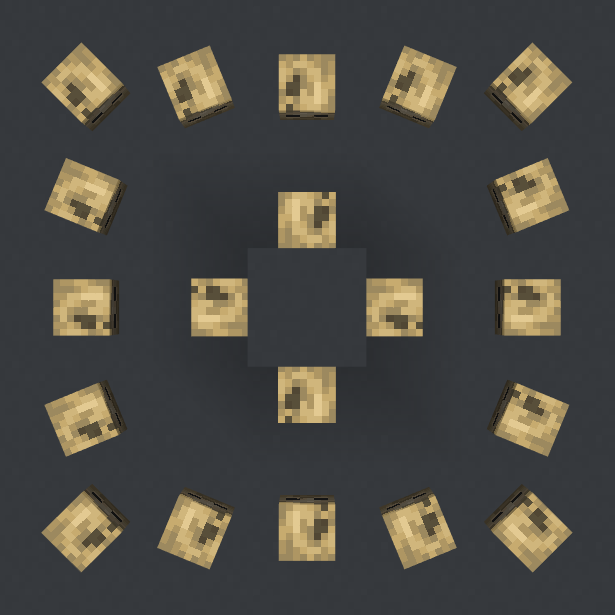
Custom head blocks in a square formation, each pointing towards the middle

Download Example Pack ​

Template pack made according to this tutorial, adding a "Custom Head" block that is dropped when husks are exploded by charged creepers.

Download MCADDON

Contributors

Edit Custom Heads on GitHub

Text and image content on this page is licensed under the Creative Commons Attribution 4.0 International License

Code samples on this page are licensed under the MIT License

Bedrock Wiki by Bedrock OSS

"Minecraft" is a trademark of Mojang AB.

Bedrock OSS, Bedrock Wiki and bedrock.dev are not affiliated in any way with Microsoft or Mojang AB.

  • Privacy Policy
  • Join our Discord
  • Learn how to Contribute
  • Visit our Repository