Multi-Blocks
What Are Multi-Blocks?
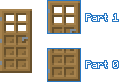
A multi-block is a type of block that is able to occupy the space of more than a single block unit (16×16×16 pixel cube) in a given direction. This is because multi-blocks are actually comprised of smaller individual blocks known as parts.
An example of an existing vanilla multi-block is the door, which has two parts: a top and a bottom.
Part Indices
Each part of a multi-block is assigned an index, starting from 0 at the position where the block was originally placed. This index is stored in the minecraft:multi_block_part state of each part of a multi-block.
Doors are a type of multi-block that extend upwards from the position where the player attempted to place the block. Therefore, the bottom part of the door is assigned an index of 0 and the top of the door is assigned the next index of 1.
Selection
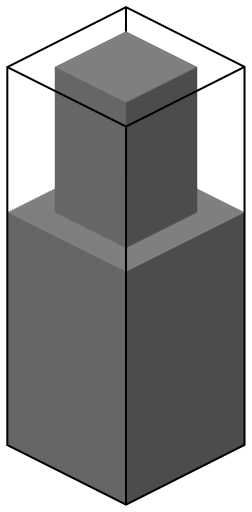
Parts of a multi-block are technically separate blocks, meaning that only one part of a multi-block can be selected at once. However, Minecraft performs some visual trickery which makes it look like the player is selecting the entire multi-block:
When "outline selection" is enabled in video settings, the selection outline will appear as a single large box that encompasses the selection boxes of all parts. Note that this larger selection outline is purely visual so, in reality, the selection boxes of each part are still treated individually.
When "outline selection" is disabled in video settings, all parts of the multi-block will be highlighted when any part is selected.
Destruction
When part of a multi-block is broken, all other parts of the multi-block are also broken as a result. However, only the part that was originally broken drops its loot.
When part of multi-block is being mined, destruction cracks are displayed on all parts of the multi-block simultaneously. However, given that mining progress is stored for each part individually, progress will be reset if the player changes the part that is being targeted in the middle of mining.
Creating Multi-Blocks
Multi-Block Trait
To register a block type as a multi-block, it must have the minecraft:multi_block trait. This block trait allows you to define how many parts your multi-block has and the direction in which it extends.
Custom multi-blocks can have 2-4 parts.
{
    "format_version": "1.26.20",
    "minecraft:block": {
        "description": {
            "identifier": "wiki:multi_block_example",
            "traits": {
                // This trait causes the block to be treated as a multi-block
                "minecraft:multi_block": {
                    "enabled_states": ["minecraft:multi_block_part"], // This state stores the index of each part
                    "direction": "up", // May also be "down"
                    "parts": 2 // Must be in the range 2-4
                }
            }
        },
        "components": {
            // Multi-blocks cannot be pushed by pistons
            "minecraft:movable": {
                "movement_type": "popped"
            }
        }
    }
}Part Visuals
Let's give each part of this multi-block its own appearance, similar to how the lower and upper parts of a door have different textures.
We can do this using the permutations array, with conditions querying q.block_state('minecraft:multi_block_part').
{
    "format_version": "1.26.20",
    "minecraft:block": {
        "description": {
            "identifier": "wiki:multi_block_example",
            "traits": {
                // This trait causes the block to be treated as a multi-block
                "minecraft:multi_block": {
                    "enabled_states": ["minecraft:multi_block_part"], // This state stores the index of each part
                    "direction": "up", // May also be "down"
                    "parts": 2 // Must be in the range 2-4
                }
            }
        },
        "components": {
            // Multi-blocks cannot be pushed by pistons
            "minecraft:movable": {
                "movement_type": "popped"
            },
            // Visuals for part 0
            "minecraft:geometry": "geometry.example_bottom",
            "minecraft:material_instances": {
                "*": {
                    "texture": "wiki:example_bottom"
                }
            }
        },
        "permutations": [
            {
                "condition": "q.block_state('minecraft:multi_block_part') == 1", // Checks for part 1
                "components": {
                    // Visuals for part 1
                    "minecraft:geometry": "geometry.example_top",
                    "minecraft:material_instances": {
                        "*": {
                            "texture": "wiki:example_top"
                        }
                    }
                }
            }
        ]
    }
}Horizontal Multi-Blocks
You may instead want your multi-block to extend horizontally in the cardinal direction the player is facing. This can be achieved by setting the direction parameter to any horizontal direction (the exact value is ignored as long as it isn't "up" or "down") and enabling the minecraft:cardinal_direction state.
"traits": {
    // This trait causes the block to be treated as a multi-block
    "minecraft:multi_block": {
        "enabled_states": ["minecraft:multi_block_part"],
        "direction": "north", // Makes this multi-block horizontal
        "parts": 2
    },
    // This trait enables cardinal direction
    "minecraft:placement_direction": {
        "enabled_states": ["minecraft:cardinal_direction"]
    }
}Block Item
By default, the block will only display its first part (with index 0) when represented as an item, leading to the block looking cut-off in the inventory. This issue can be overcome in two ways:
By giving the block a 2D item icon by replacing its block item with an item that has the
minecraft:iconcomponent. This is the approach taken by vanilla multi-blocks such as beds, doors and tall grass.By giving the item representation of the block dedicated geometry and material instances using the
minecraft:item_visualcomponent.
Multi-Block Limitations
Components
- For the
minecraft:geometrycomponent, then_way_visual_rotationparameter is not supported.
The following components may not be specified in the permutations array of a multi-block definition so can only be applied in the root components object.
minecraft:movableminecraft:placement_filterminecraft:precipitation_interactionsminecraft:random_offsetminecraft:replaceable
Movability
Multi-blocks cannot be pushed by pistons as this would allow parts to become disconnected when moved. Therefore, a minecraft:movable component must be defined with a movement_type of either "immovable" or "popped". Omitting this component will prevent the block from being registered as well as displaying an error in the content log.
Most vanilla multi-blocks are popped off as items when a piston attempts to push them, excluding extended pistons which are immovable.
"minecraft:movable": {
    "movement_type": "popped"
}Snowlogging
Attempting to place snow in part of a snowloggable multi-block will result in the multi-block being submerged in snow from its bottom part upwards, rather than the snow always being placed in the part that was selected.
Targeting part of a multi-block that contains snow will select the snow layer rather than the multi-block. This means that attempting to break a snowlogged part will break the snow layer, leaving the multi-block. However, attempting to break a part that is not snowlogged will break the multi-block, leaving any snow layers.
State Equality
Excluding the minecraft:multi_block_part state, the states of every part of a multi-block must have equal values. For example, doors have a minecraft:cardinal_direction state that determines which direction the door should face. By requiring this state to be equal across parts, the top and bottom of the door will never be facing different directions.
To change the value of a multi-block state, the state must be updated on every part simultaneously.
Using scripts, this can be achieved by getting all parts associated with a given block using the getParts() method. This method returns an array of the individual blocks that make up the multi-block in part index order. We can then set the permutation of every part at the same time, preventing the multi-block from breaking due to unequal states across parts.
// Assume we have ensured that "block" is a part of the multi-block
for (const part of block.getParts()) {
    part.setPermutation(part.permutation.withState("wiki:color", "red"));
}Traits
- The
minecraft:connectiontrait is not supported by multi-blocks. - The
minecraft:placement_positiontrait is not supported by multi-blocks. - For the
minecraft:placement_directiontrait, only"minecraft:cardinal_direction"is supported as an enabled state.
Event Triggering
Custom Component Hooks
The
beforeOnPlayerPlace()hook is only called for the first part of a multi-block.- Modifying the
permutationToPlaceevent property will change the states of all parts that are subsequently placed. - Modifying the
minecraft:multi_block_partstate will prevent the multi-block from being placed.
- Modifying the
The
onPlace()hook is called for every part of a multi-block in part index order.The
onBreak()hook is only called for the part of a multi-block that was originally broken, not for the other parts that are broken as a result.The
onPlayerBreak()hook is not supported by multi-blocks so will never be called. Consider using theonBreak()hook instead:jsonBreak(event) { // Whether the block was broken by a player const wasBrokenByPlayer = event.entitySource instanceof Player; // Exit the hook if the block was not broken by a player if (!wasBrokenByPlayer) return; console.log("A player broke the multi-block!"); }
World Event Signals
Subscriptions to the following event signals are only called for the first part of a multi-block:
world.beforeEvents.playerPlaceBlockworld.afterEvents.playerPlaceBlock
Subscriptions to the following event signals are only called for the part of a multi-block that was targeted:
world.beforeEvents.playerBreakBlockworld.afterEvents.playerBreakBlock
Contributors

Text and image content on this page is licensed under the Creative Commons Attribution 4.0 International License
Code samples on this page are licensed under the MIT License